
“Optionsmith has been the options platform I’ve been waiting for. It lets me visualize, chart, adjust, and manage positions, with several features I simply haven’t seen on other platforms—and it continues to get better at a very affordable price. Customer service has also been extremely responsive, and it’s clear the people behind Optionsmith understand trading and genuinely care about the retail trader.”
Next-generation options trading system System online
Build the strategy. Visualize the risk. Execute in seconds.
See every position on one risk picture, and know how a new trade or an adjustment changes it before you send it. Built for Charles Schwab accounts: orders route through Schwab from the same screen.
Get started
Request access to Optionsmith
Access is currently limited to approved requests. Tell us a bit about yourself below and we’ll email you when you’re approved — no card required.
- No credit card
- Simulated demo first — no brokerage needed
- Connect Schwab when ready to start the 14-day live trial
“For me it’s all about seeing a trade before placing a trade.” — Jeff, Optionsmith customer Read trader reviews
Trader signal
What Optionsmith customers say
Customer reviews
01 / 04
“I think Optionsmith will look and feel somewhat familiar with users accustomed to Tasty Trade or Think or Swim/Schwab. But they have taken visualization to a new level. For me it’s all about seeing a trade before placing a trade. Lots of flexibility and features for account management and analytics as well. give it a try.”
“Optionsmith is a Godsend. It’s built for the visual trader—the interface is smooth, quick, and web-based. Every upgrade I’ve requested was implemented within days. The team is trader-focused and extremely responsive.”
Read Addison’s full review
“I must say that Optionsmith is a Godsend. Every single upgrade I have requested was implemented within a few days without hesitation. This is an astounding feat considering requests over five years to other brokerage platforms have never been implemented. Optionsmith is definitely built for the visual trader. The interface is smooth, quick, and web-based, which is necessary as I am unable to download brokerage software on my work computer. The team is trader-focused and extremely responsive.”
“I just wanted to let you know how happy I am with the Optionsmith platform and support. There are so many good ideas within the platform that are technically brilliant but very intuitive to use. It’s not until you start using the site that you realise how much is available within the platform, I’m still finding new stuff six months in. I asked if a particular item could be added and within a week it had. Features like Visualizer and the Strategy Templates make setting up a multi-leg trade so easy with its graphic depiction of the trade. Updates keep coming.”
Reviews from Optionsmith customers.
After you sign up
Two ways to start
Every account can explore a simulated demo. Connect Schwab whenever you’re ready — that’s when your 14-day live trial begins.
Explore with simulated data
Available as soon as your account is verified. Positions, prices, analytics, and orders are all clearly labeled as simulated — nothing is connected to Schwab, and no real trade can be placed.
- Full access to the visualizer, strategy builder, and analytics
- Simulated prices — not delayed real quotes
- No Schwab connection required
- Does not start your 14-day live trial
Trade with live data and Schwab execution
Begins the moment you connect a Charles Schwab brokerage account. You’ll see live account and market data, and can submit real orders under the same safeguards described below.
- Starts when Schwab is connected — not at account creation
- Live account and market data
- Real order submission to Schwab
- No card required to begin — $9.99/month after the trial if you continue
See it in action
A short product walkthrough
Screens captured from live trading sessions — no mock data, no marketing renders.
Why Optionsmith
Three things no other tool does together
Send the trade, not just see it
Orders route straight to Schwab from the same screen — most visualization tools stop at the chart.
Rolling P&L that remembers
Cost basis carries forward across every roll, so P&L reflects the whole strategy, not just today’s leg.
Point-and-click, not manual entry
Click strikes on the live chain and the draft order builds itself — no spreadsheet, no manual leg entry.
Capabilities
Built to manage positions with effortless precision
Most retail platforms stop at order entry. Optionsmith is designed around the part that comes after: adjusting, rolling, and knowing exactly where a position stands weeks into its life.
| No. | Capability | Detail |
|---|---|---|
| 01 | Position visualizer | Payoff curves at expiration and at any projected date, with breakevens, max risk, max profit and probability of profit computed live as you drag the projection slider. |
| 02 | Visual strategy builder | Calls and puts render side by side with live bid/ask. Click strikes to stage each leg and the draft order builds itself — no manual entry, no spreadsheet. |
| 03 | Roll tracking | Roll a short put out and down and Optionsmith keeps the lineage: cost basis carries forward, realized credit accumulates, and rolling P&L reflects the whole strategy. |
| 04 | Performance analytics | Rolling P&L history, win rate, profit factor and per-strategy attribution — so you can tell which parts of your book are actually paying for themselves. |
| 05 | Trade journal | Tag positions, attach notes and record the reasoning behind an adjustment. Every closed trade keeps its full decision history for review. |
| 06 | Direct order submission | Orders are checked before they leave the browser — leg consistency, buying power, fees — then routed straight to Schwab. Most visualization tools stop at the chart; Optionsmith sends the order too. |
The interface
Dense where it matters, quiet everywhere else
Screens captured from live trading sessions. No mock data, no marketing renders.
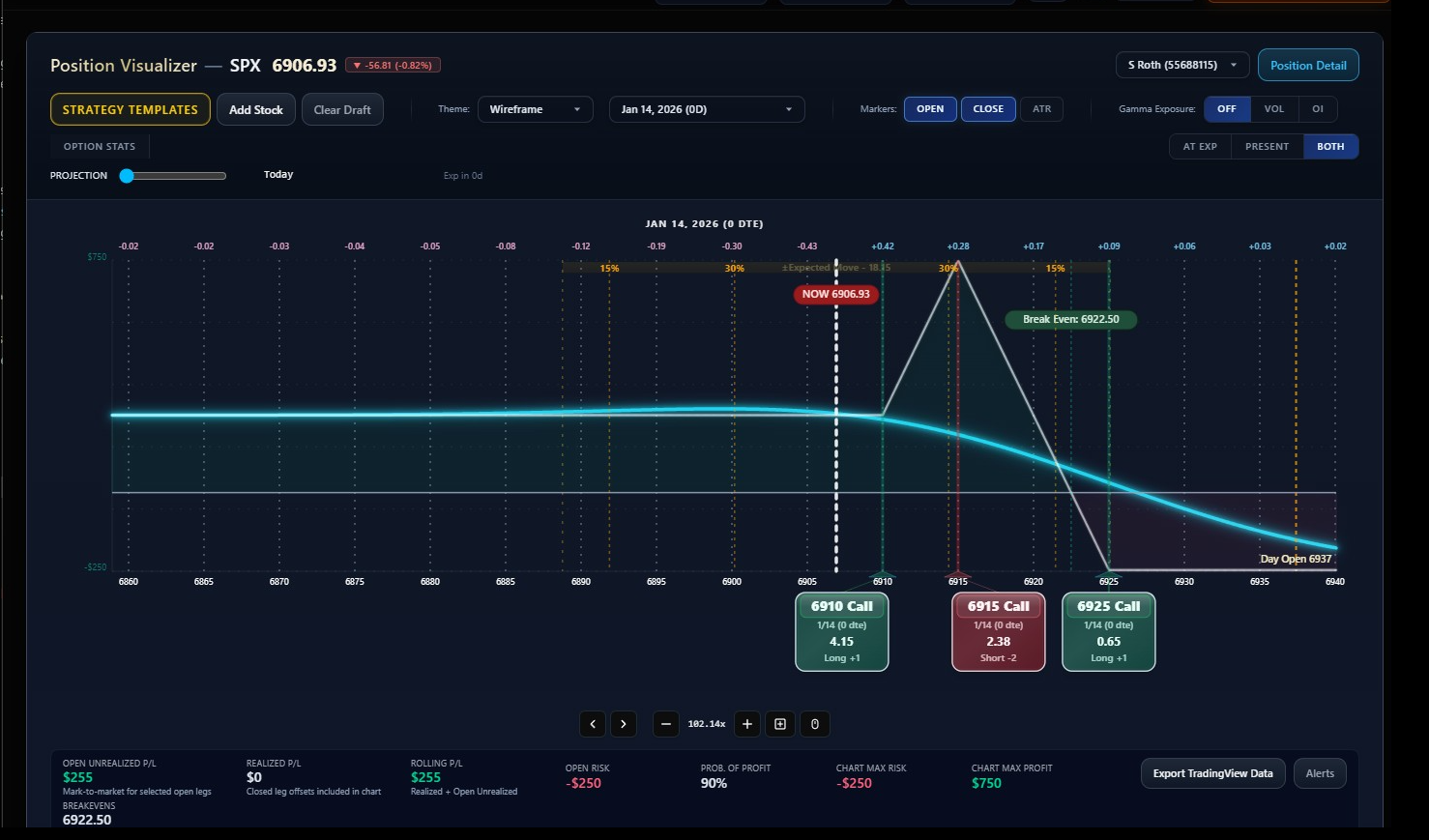
See the whole risk surface at once
Payoff at expiration and at present, overlaid. Expected-move bands, break-even markers and per-strike price cards sit directly on the chart, so the shape of the trade is legible without leaving the screen.
- Projection slider models any date between now and expiration
- Break-even, max risk and max profit recalculated on every change
- Strategy templates for condors, butterflies, verticals and calendars
- Export chart data straight to TradingView
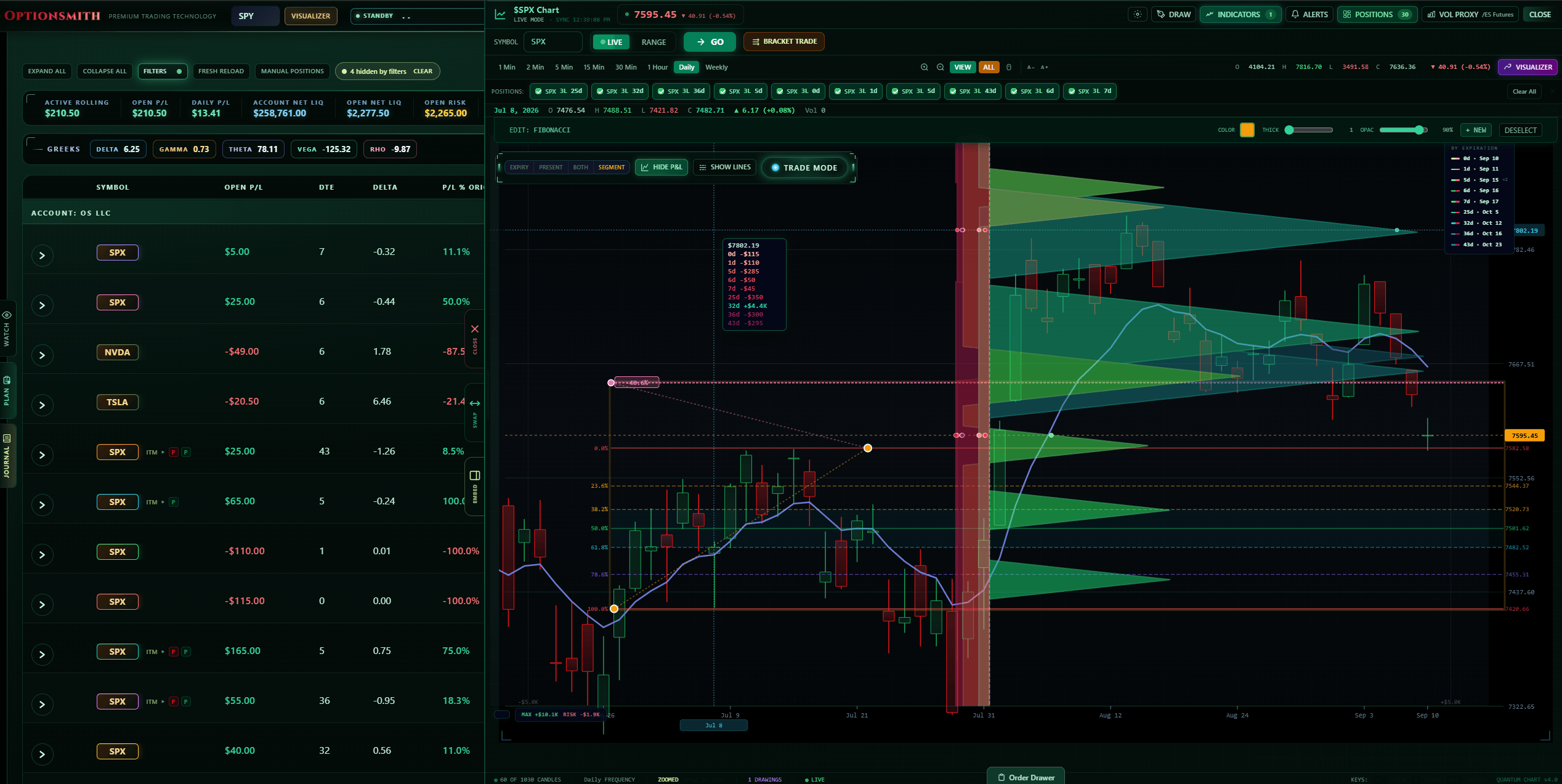
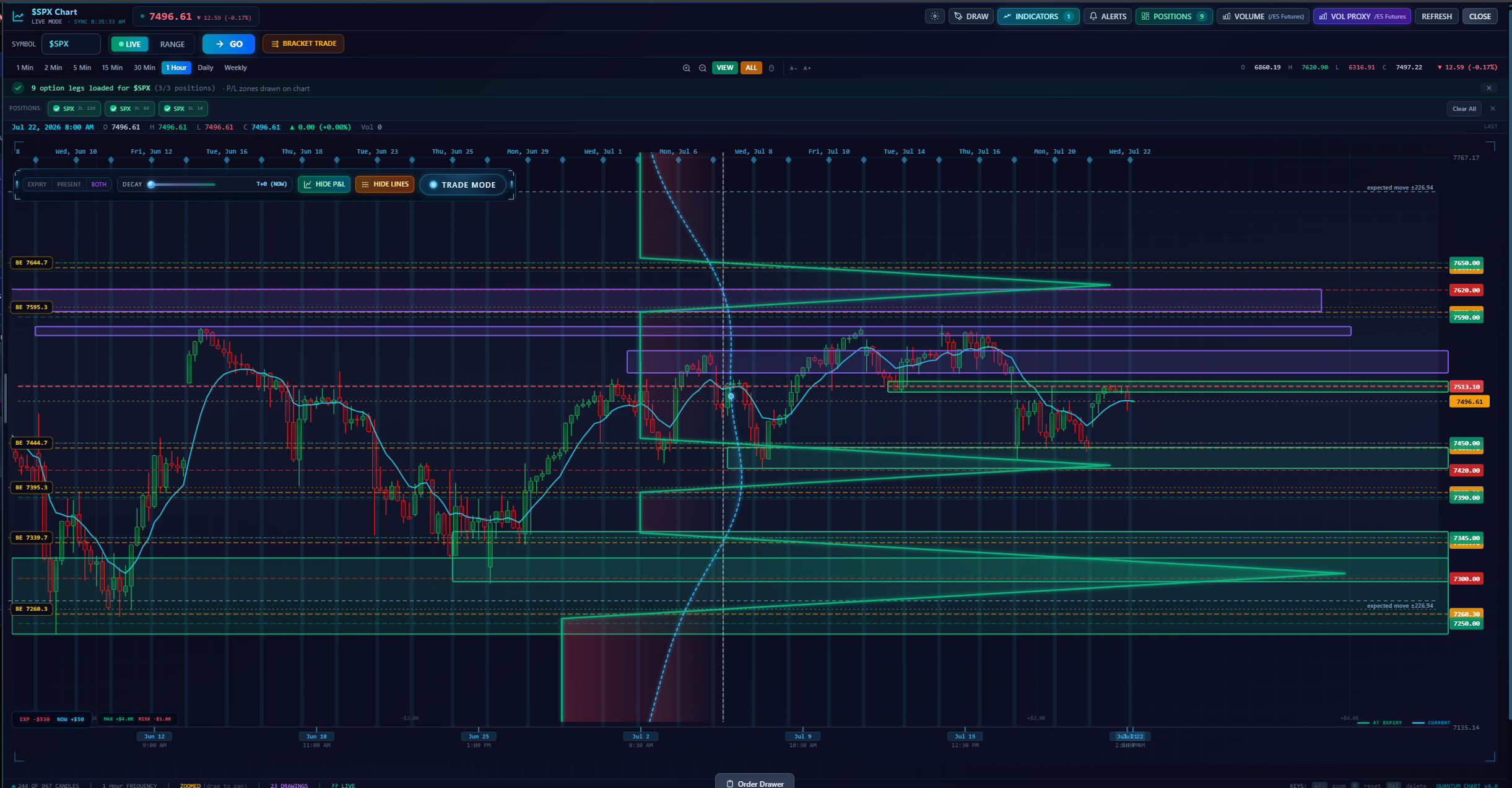
Your position, drawn on the price chart
Profit and loss zones project forward onto live candles, so the structure you built and the market you built it in sit on the same canvas. Draw, add indicators, or simulate forward without leaving the position.
- Max profit and max loss regions overlaid on price
- One-minute through weekly frequencies with live sync
- Drawing tools and indicators alongside position legs
- Visualizer and chart docked side by side
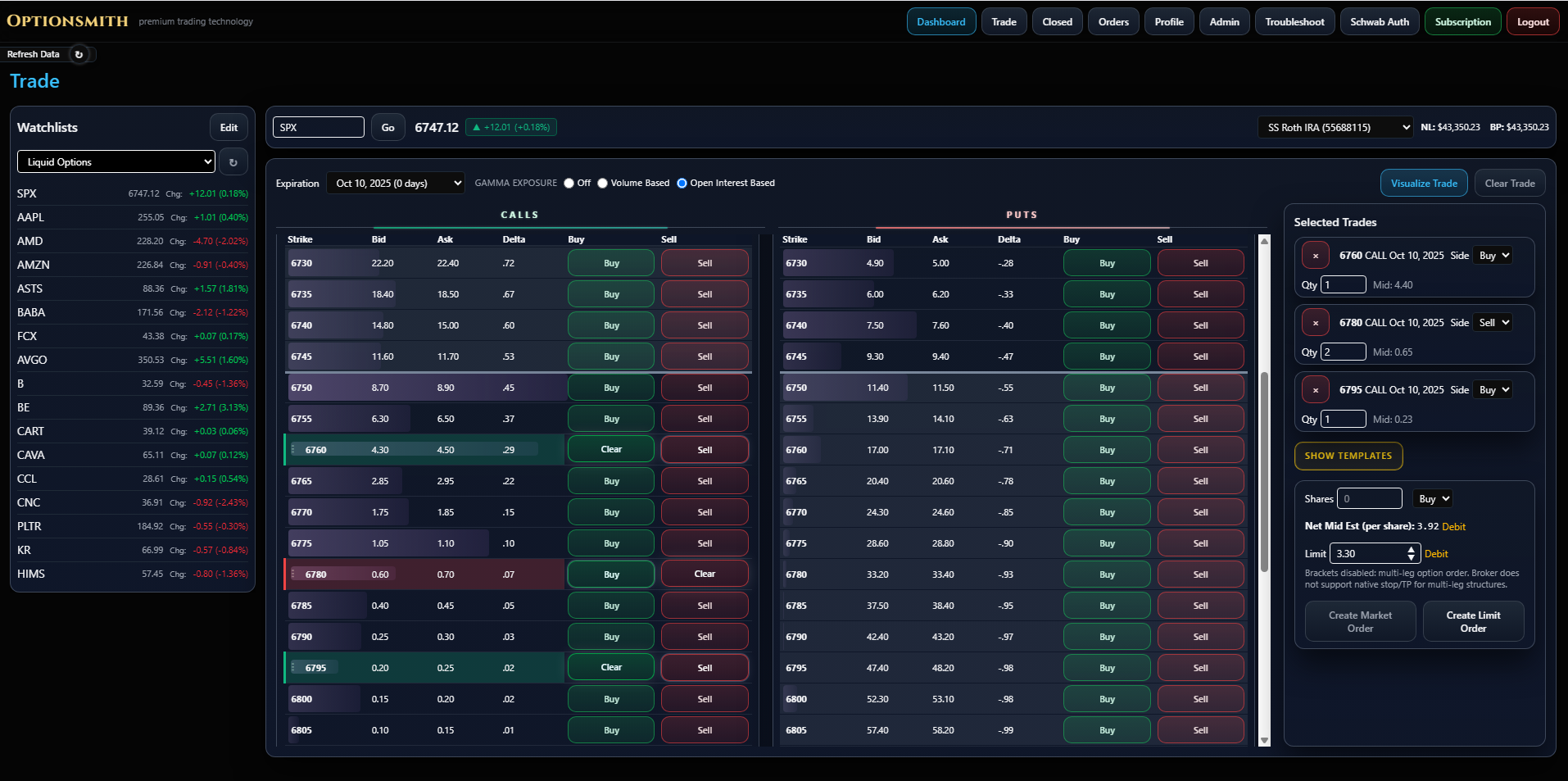
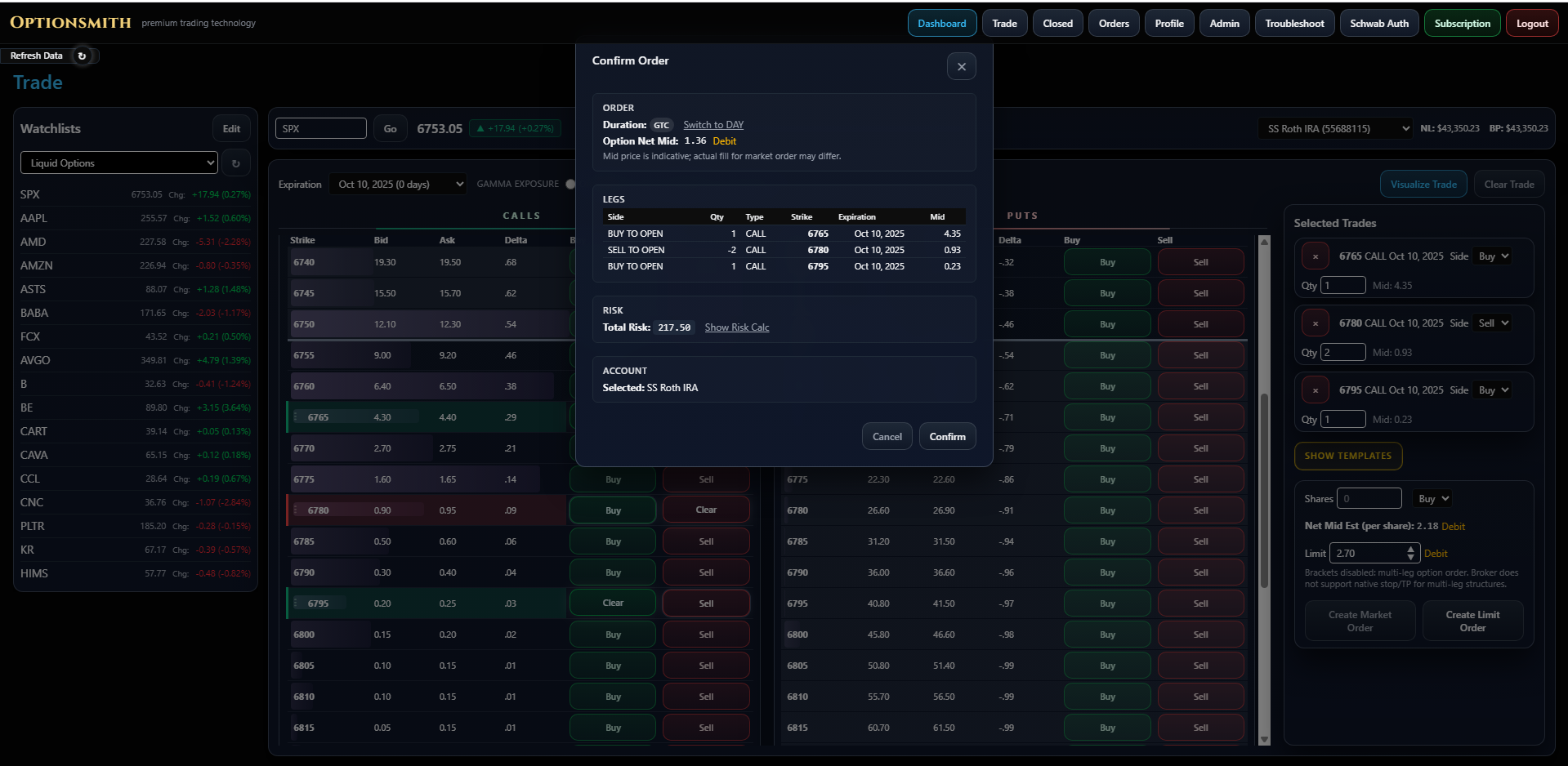
Build your trade visually — in seconds
Whether you prefer to construct your position right on the price chart, in the position visualizer, or with the option chain, Optionsmith makes it fast. With templates for iron condors, butterflies, credit spreads and more, the trade you have in mind is ready to go in a few clicks.
- Point-and-click construction — no manual leg entry
- Watchlists with live quotes and day change
- Multi-leg drafts with per-leg quantity and side
- Market or limit submission straight to Schwab, from the same screen
Filled right from the platform — across accounts
Submit your order to one Schwab account or many, with a full leg-by-leg breakdown before anything is sent.
- Leg-by-leg breakdown with strike, expiry and side
- Choose from multiple accounts
- Add trades to an existing position, or track them as a new one
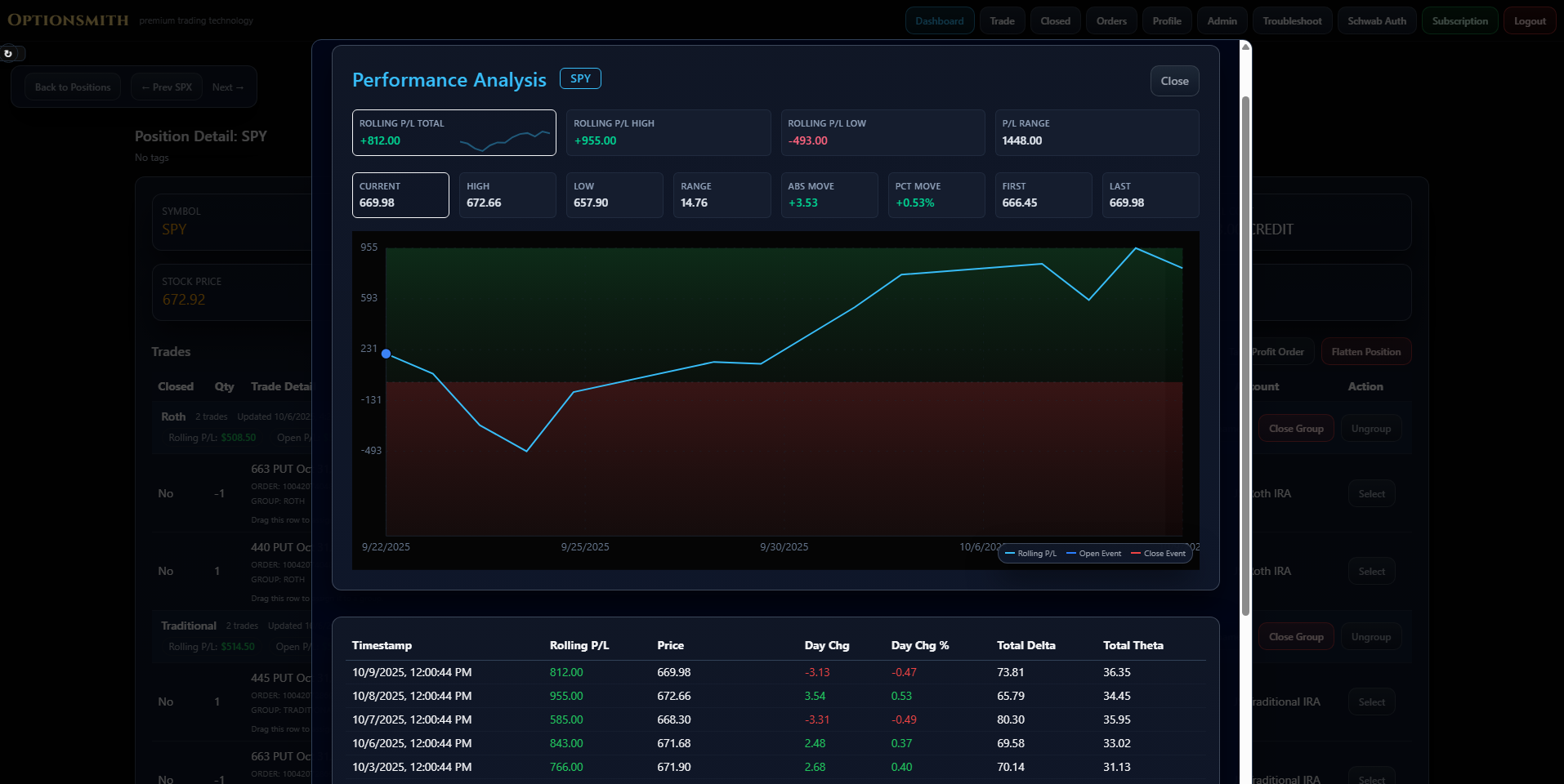
Rolling P&L, not just today’s number
Track a position’s realized and unrealized P&L across its full life, including every roll and adjustment, with the underlying price plotted alongside for context.
- Rolling P&L high, low and total range
- Open and close events marked on the timeline
- Per-snapshot P&L and price history
Common question
Why not just use thinkorswim?
Schwab already gives you thinkorswim for free, so paying $9.99/month for something else needs a real reason. Here’s the difference:
- Strategies are point-and-click on visual charts, not manually finding individual legs.
- Rolling P&L carries the cost basis forward across every adjustment — thinkorswim shows you the current ticket, not the ongoing strategy.
- The chain, the builder and order submission live in one visual screen instead of thinkorswim’s denser, more manual interface.
Corporate Insight has found broker-native trading tools are commonly underused due to poor UX — Optionsmith is built specifically for the part thinkorswim makes tedious: managing a position after it’s already open.
Security
How Optionsmith connects to Schwab
Optionsmith is a software provider, not a broker-dealer or investment adviser. It never holds your funds and never places a trade you didn’t submit.
- Connects through Schwab’s own OAuth flow — the same one third-party apps have used with Schwab for years.
- Optionsmith never sees or stores your Schwab password.
- You can revoke access from Schwab at any time.
- Optionsmith is not affiliated with or endorsed by Charles Schwab.
FAQ
Questions
Do I need a Schwab account?
Not to get started. You can explore the full platform with simulated data right after creating an account. A Charles Schwab brokerage account is only required when you connect it to begin your 14-day live trial.
Does creating an account start my trial?
No. Your 14-day live trial begins only when you connect a Schwab account. Creating an account gives you the simulated demo — nothing about your live trial starts until you connect Schwab.
Why pay when thinkorswim is free?
thinkorswim comes with your Schwab account, but it’s built for placing individual orders, not for staying on top of a position after it’s open. Optionsmith adds point-and-click strategy building, rolling P&L that carries the cost basis forward across every adjustment, and the chain, builder and order screen in one view instead of thinkorswim’s denser interface.
Is my Schwab login safe?
Yes. You connect through Schwab’s own OAuth flow, the same one third-party apps have used with Schwab for years. Optionsmith never sees or stores your Schwab password, and you can revoke access from Schwab at any time.
How long is the live trial?
14 days from the moment you connect Schwab. No card is required to begin, and it’s $9.99/month only if you decide to continue after the trial ends.
Can I use Optionsmith with other brokers?
Not yet — order routing and the live trial currently work through Schwab’s trading API only. The simulated demo doesn’t require any broker, so you can still explore the platform either way.
What does $9.99/month include?
Full access to the position visualizer, the visual strategy builder, roll tracking with cost-basis carry-forward, performance analytics, the trade journal, and direct order submission to Schwab — the same six capabilities described above, nothing held back for a higher tier.
Get started
Put your own positions in it
The fastest way to judge Optionsmith is to point it at a portfolio you already know. Send your request and we’ll email you when you’re approved.
Request accessSimulated demo on approval — connect Schwab anytime to start your 14-day live trial.
Get started
Put your own positions in it
The fastest way to judge Optionsmith is to point it at a portfolio you already know. Create your account and explore the simulated demo, or connect Schwab to start your 14-day live trial.
Create your free accountNo credit card required — $9.99/month after your live trial, cancel anytime.